> For the complete documentation index, see [llms.txt](https://docs.168money.com.tw/llms.txt). Markdown versions of documentation pages are available by appending `.md` to page URLs; this page is available as [Markdown](https://docs.168money.com.tw/zui-xin-gong-gao/2025-7-12-yue-zui-xin-gong-gao.md).
# 2025/ 7 - 12月 最新公告
📢【 **系統公告|綜合收單頁內部功能調整通知** 】📢\
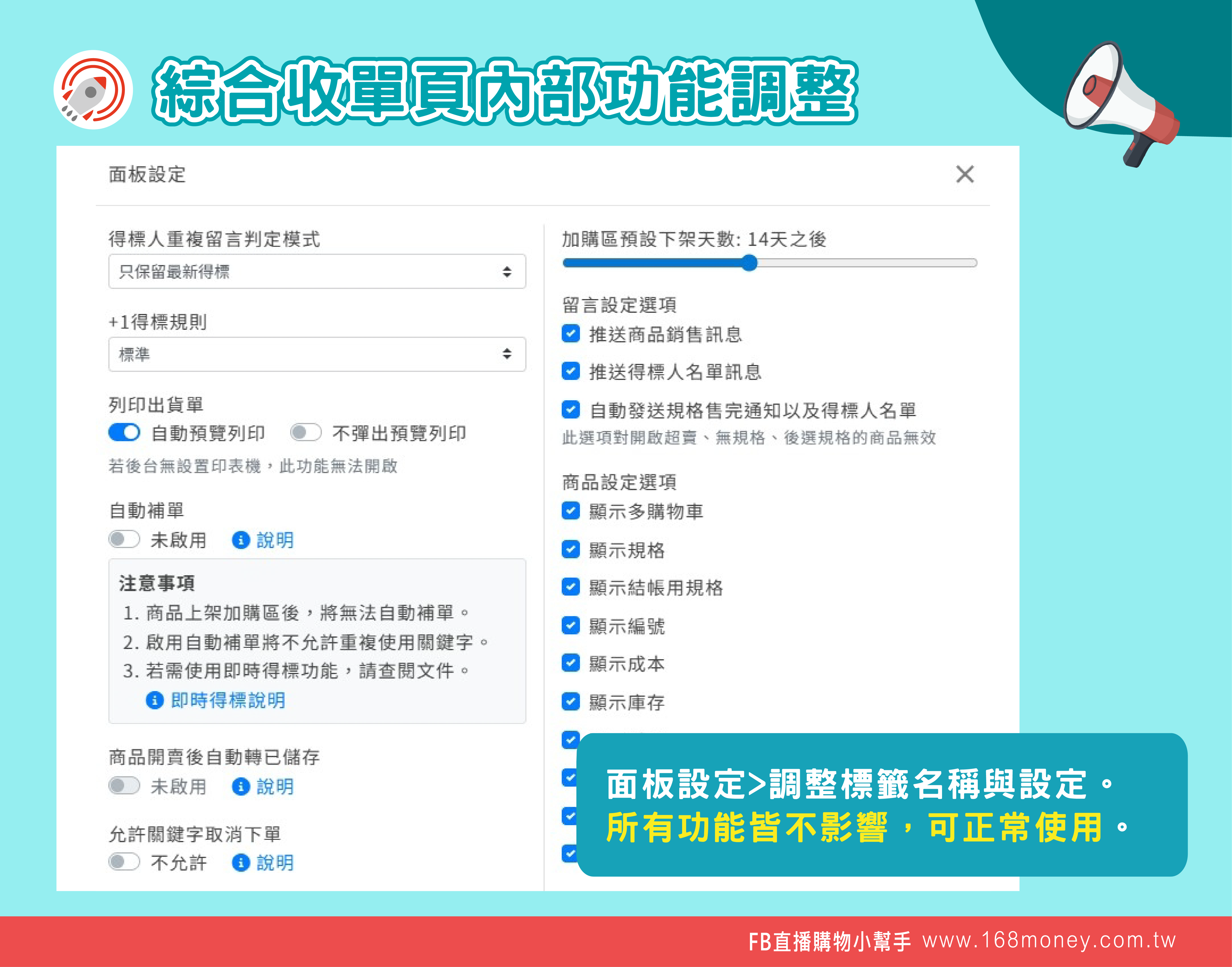
12/16起進行綜合收單頁面板設定(右上角齒輪)內部調整設定,標籤名稱皆會重新命名。以下提供相關修改細節,以及修改後的設定畫面。
🔹 `抓取留言的規則` > **+1得標規則**\
🔹 `留言橋接字元` > **+1自訂字元**\
🔹 `顯示設定庫存` > **顯示庫存**\
🔹 `顯示重量設定` > **顯示重量**\
🔹 `顯示設定單筆限制` > **顯示+1數量限制**\
🔹 `顯示常用規格` > **顯示規格**\
🔹 `顯示規格數量 (得標後才選規格)` > **顯示結帳用規格**\
🔹 `使用黑名單過濾星等` > **顯示星等過濾**\
🔹 `顯示商品編號` > **顯示編號**
* 📌 提醒您:實際綜合收單頁內所有功能皆不影響,皆能正常使用。
 \----------------------------------------------------------------------------------------------------------------------------------------------------------------------------
📢【系統更新公告】📢
\
綜合收單頁 介面調整更新!
為了讓您操作更順暢、銷售更直覺,我們針對綜合收單頁進行了一系列優化調整👇
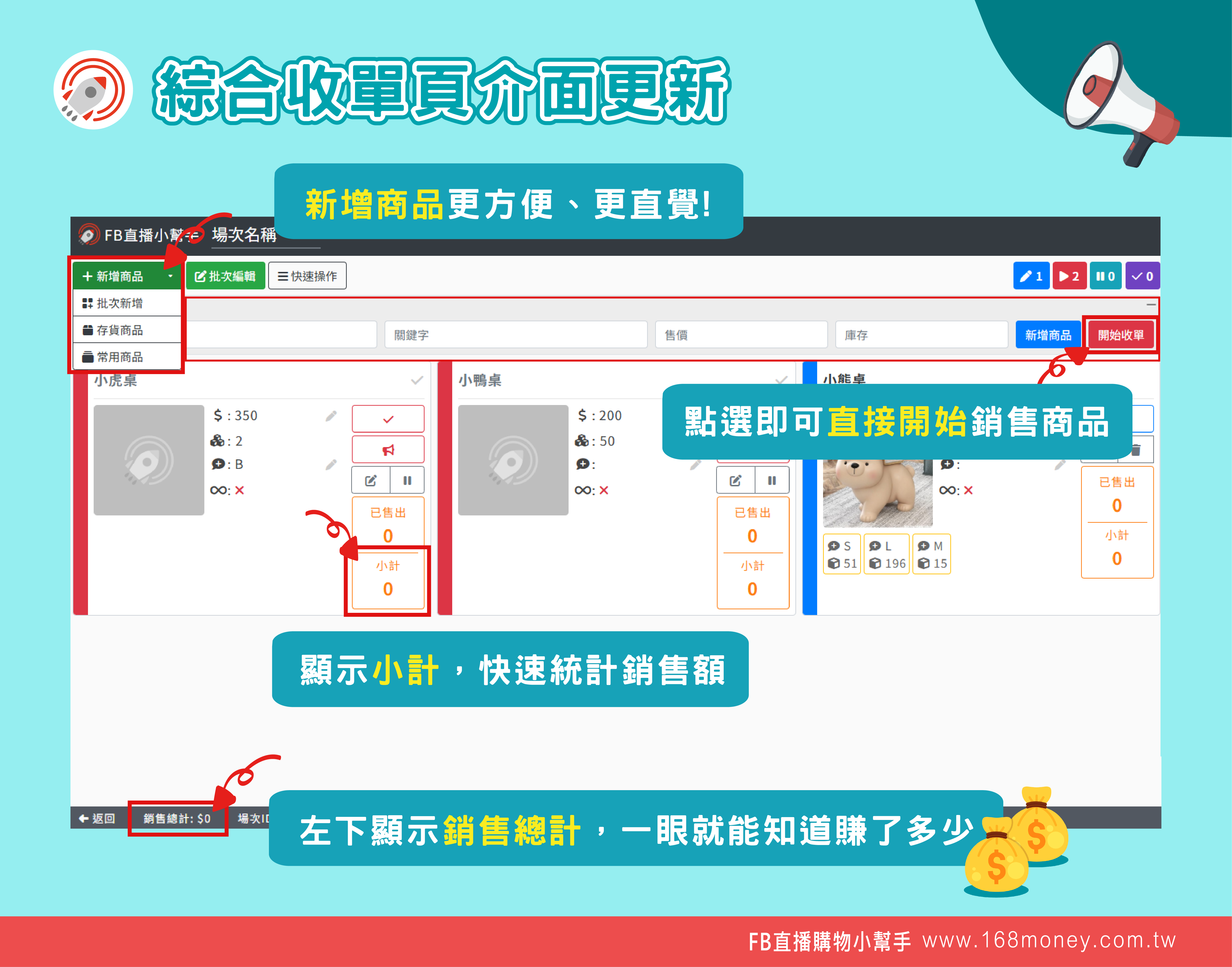
🔹 新增商品更方便!\
左上新增綠色「+新增商品」按鈕,介面更簡潔!
🔹 快速新增商品欄位獨立出來!\
快速新增商品,直播流程操作不卡頓!
🔹 顯示小計,快速掌握單品銷售金額\
每個商品區塊皆自動顯示小計金額,不再需要手動計算。
🔹 左下方新增「銷售總計」\
結單前一眼就知道目前總銷售金額,清楚又省時!
⏰ 立即體驗新介面,讓收單工作更有效率!\
如有任何操作問題,歡迎聯繫我們的客服團隊協助您
\----------------------------------------------------------------------------------------------------------------------------------------------------------------------------
📢【系統更新公告】📢
\
綜合收單頁 介面調整更新!
為了讓您操作更順暢、銷售更直覺,我們針對綜合收單頁進行了一系列優化調整👇
🔹 新增商品更方便!\
左上新增綠色「+新增商品」按鈕,介面更簡潔!
🔹 快速新增商品欄位獨立出來!\
快速新增商品,直播流程操作不卡頓!
🔹 顯示小計,快速掌握單品銷售金額\
每個商品區塊皆自動顯示小計金額,不再需要手動計算。
🔹 左下方新增「銷售總計」\
結單前一眼就知道目前總銷售金額,清楚又省時!
⏰ 立即體驗新介面,讓收單工作更有效率!\
如有任何操作問題,歡迎聯繫我們的客服團隊協助您
 \----------------------------------------------------------------------------------------------------------------------------------------------------------------------------
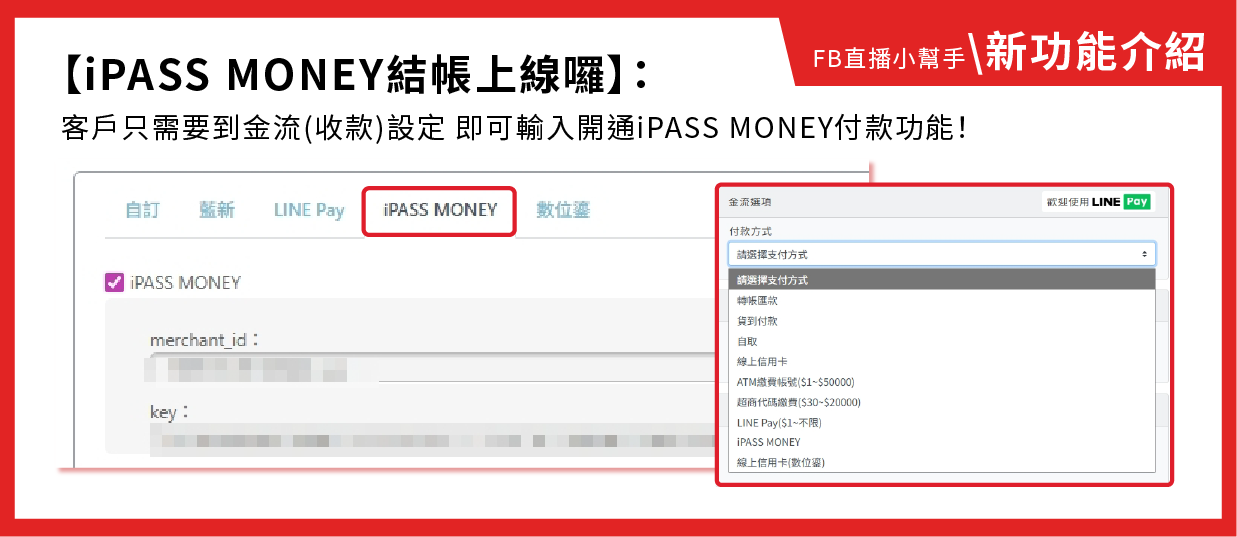
📢【系統公告|iPASS money一卡通付款功能新增通知】
\
\
**💸 一卡通 iPASS Money 金流正式支援啦!**
為了因應 **Line Pay 與一卡通的支付服務調整**,我們新增支援「一卡通 iPASS Money」付款方式,讓商家擁有更多收款選擇!
✅ 客戶結帳更便利
✅ 成交率再提升!
**🙋♂️ 如何申請啟用?**
👉 直接聯繫我們客服即可~
流程簡單,我們會一步一步協助您完成設定!
\----------------------------------------------------------------------------------------------------------------------------------------------------------------------------
📢【系統公告|iPASS money一卡通付款功能新增通知】
\
\
**💸 一卡通 iPASS Money 金流正式支援啦!**
為了因應 **Line Pay 與一卡通的支付服務調整**,我們新增支援「一卡通 iPASS Money」付款方式,讓商家擁有更多收款選擇!
✅ 客戶結帳更便利
✅ 成交率再提升!
**🙋♂️ 如何申請啟用?**
👉 直接聯繫我們客服即可~
流程簡單,我們會一步一步協助您完成設定!